Important News
-
05/01/2010 (reduction factor)
ok, the official answer is that its just an approximation, and when the numbers are large (i.e. 100,000) the formula (Term col > value has RF (High(I)-value)/(High(I)-Low(I))) is close enough.
(sorry, i expected something more interesting as well :) )
-
05/01/2010 (XML)
so i owe you the examples for slide 19 (xml-cont).. much simpler example than the one i originally intended to show.. lets assume we have the following XML file:
< book >
< price > 5 < / price >
< price > 4 < / price >
< quant1 > 3 < / quant1 >
< quant2 > 2 < / quant2 >
< / book>
(the key observation is that there are two "price" elements in book.)
assuming "$b= /book" we get the following:
$b/price < price > 5 < / price >
< price > 4 < / price >$b/price * 2 < price > 10 < / price >
< price > 8 < / price >$b/price * $b/quant1 < price > 15 < / price >
< price > 12 < / price >$b/price * ($b/quant1 + $b/quant2) < price > 25 < / price >
< price > 20 < / price >$b/price * $b/quant1 + $b/price * $b/quant2) to simplify, you can see the "middle" calculation:
< price > 15 < / price > < price > 10 < / price >
+
< price > 12 < / price > < price > 8 < / price >
finally, we get the following (cartesian product..):
< price > 25 < / price >
< price > 23 < / price >
< price > 22 < / price >
< price > 20 < / price >
-
21/12/2009 (Java memory size)
I just checked, and a Map with 4M entries (Strings,Integer) takes ~500M in the memory.
In other words, you have no problem to use the optimization "trick" (loading all the data) of the "auxiliary" tables (genres, artist, etc.)
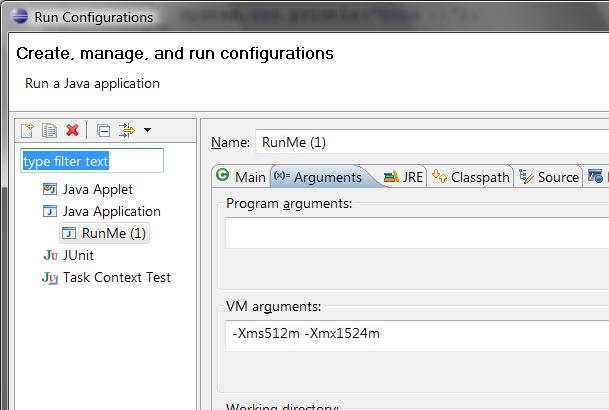
To tell Java to use more than the default memory, use the "-Xms512m -Xmx1524m" parameters. i.e. from the command:
java -Xms512m -Xmx1524m yourprogram.jarif you use run it from eclipse, see the following image:
-
21/12/2009 (Determine ASCI chars)
Useful example by Gaby Rubin to identify ASCI characters.
(reminder, you can filter out disks which contains non-ASCI chars)
				Pattern _notAsciiPattern = Pattern.compile("[^\\p{ASCII}]");

_notAsciiPattern.matcher( "YOUR STRING" ).find(); -
12/11/2009 - 18:00
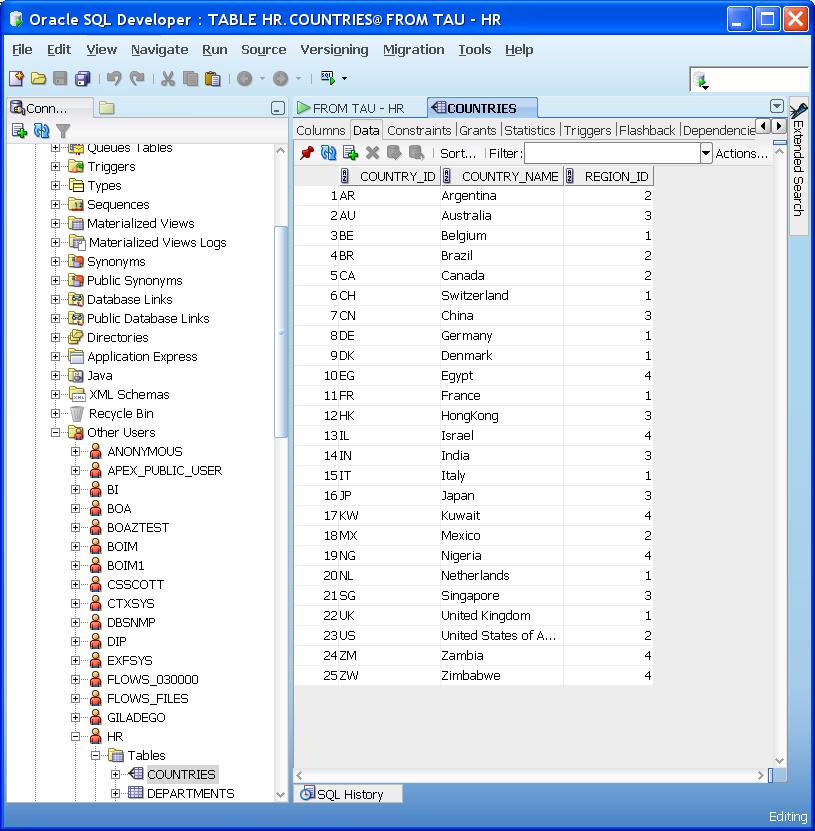
When you connect to TAU's database with the "hr_readonly" user, you won't see the corresponding tables listed on SQLDeveloper.
You can see them by going to "Other Users"-->"HR"-->Tables.
Note that the "hr_readonly" use has the "HR" namespace - i.e. when writing a query is enough to write "SELECT * FROM jobs" (instead of "SELECT * FROM hr.jobs").
-
Welcome..
Welcome to the course :)